flowchart LR
    A["Raw Data<br>ADLS2"] --> B["Bronze<br>Ingest"]
    B --> C["Silver<br>Clean + Enrich"]
    C --> D["Gold<br>KPI Aggregates"]
    C --> E["ML Feature Table<br>dbt"]
    E --> F["Model Training<br>Databricks / Snowflake"]
    F --> G["ML Predictions<br>Gold Table"]
    D --> H["Power BI<br>Dashboard"]
    G --> H

    style A fill:#0057b8,color:#fff,stroke:#003d82
    style B fill:#475569,color:#fff,stroke:#334155
    style C fill:#0369a1,color:#fff,stroke:#075985
    style D fill:#01065c,color:#fff,stroke:#000940
    style E fill:#6d28d9,color:#fff,stroke:#5b21b6
    style F fill:#6d28d9,color:#fff,stroke:#5b21b6
    style G fill:#4c1d95,color:#fff,stroke:#3b0764
    style H fill:#107c10,color:#fff,stroke:#0a5c0a
Module 9: Machine Learning (Optional)
Optional · Tip prediction on NYC Taxi Silver



Duration: 90 min — Animation (3) · Think & Discuss (8) · Theory (20) · Quiz (3) · Practice (56)
1. Animation
Story animation — mod-09-ml.mp4
If the video is unavailable in the room, your facilitator will walk through the same story beats live.
2. Think & Discuss
Situation: Marcus wants to predict tip amounts on credit-card trips so operations can tune incentives and Priya can add a predicted-vs-actual view. The lab uses existing NYC Taxi Silver from Modules 2–3.
Prompts:
- What business decision could tip prediction support? Who consumes the output — Marcus, drivers, or Priya?
- Where does ML sit relative to Bronze, Silver, Gold, and Power BI? Who builds the feature table vs who trains the model?
- Why must
total_amountnot be a feature when predictingtip_amount? Name one other column that would leak the answer. - Why train on credit-card trips only? What would the model learn if cash trips were included?
- Match each to its primary ML role (no winner yet): Databricks sklearn + MLflow · Snowflake Cortex ML · Snowpark ML · dbt
ml_features_tip_prediction - Priya — How could predicted tips land in Power BI next to existing Gold KPIs — batch scoring table vs live inference?
Note
Facilitator note: The lab filters payment_type_desc = 'Credit card' and caps fare/tip outliers — say this explicitly before the exercise.
3. Theory
WarningNot Module 6 again
Module 6 was Cortex LLM assistants. This module is predictive ML — sklearn, Snowpark ML, and ML.FORECAST.
Note
Snowflake ML Functions are distinct from the Cortex LLM features covered in Module 6.
NotePrerequisites
Modules 2–3 required · Module 4 recommended (dbt feature table track). Deliver after Module 8 when following YellowLine NYC Phase 2 story.
Snowflake: role DE_WORKSHOP_ROLE + warehouse DE_WORKSHOP_WH Started (workshop role); SNOWFLAKE.CORTEX_USER on that role (Module 6 § Cortex). Databricks: Runtime ML cluster attached (ML setup).
NoteSnowflake forecasting APIs
Labs use TABLE(ML.FORECAST(...)) as a table function. Production may use CREATE SNOWFLAKE.ML.FORECAST for persistent models — Snowflake forecasting docs.
NoteOptional Module
Delivered after the main workshop or as a standalone advanced session. Builds directly on the Silver enriched table from Modules 2 and 3 — no new data, just a new use of the data you already built.
3.2 Use Case: Predict NYC Taxi Tip Amount
Problem: Given trip characteristics at the time of dropoff, predict how much tip a passenger will leave.
This is a regression problem — we predict a continuous value (tip_amount in USD), not a category.
Why tip prediction? - Target variable tip_amount is already in the Silver table — no new data collection - Features are fully engineered: trip distance, time of day, borough, fare amount - Results are interpretable: trainees understand what makes a higher tip - Well-known benchmark — easy to find reference RMSE values online
3.3 Theory: Where ML Fits in the Data Lifecycle
Data engineers build up to the feature table. Data scientists train and deploy models. In this module, we play both roles.
Data leakage: the most common ML mistake
Leakage means including information in your features that wouldn’t be available at prediction time, or that mathematically encodes the answer.
Warning⚠️ What must NOT be a feature here
| Column | Why it’s leakage |
|---|---|
total_amount |
= fare + tip + surcharges — directly includes the target |
tip_percentage |
= tip / fare × 100 — mathematically derived from target |
payment_type (if using all) |
Cash is always 0 tip — model just learns “cash = no tip”, not real signal |
Safe features: trip_distance, fare_amount, pickup_hour, pickup_day_of_week, pickup_borough, dropoff_borough, passenger_count, time_of_day
Why credit card trips only?
Cash payments always record tip_amount = 0 — the passenger pays in cash and no tip is entered digitally. If we include cash trips, the model learns “cash → 0 tip”, polluting the real relationship between trip features and tipping behaviour.
Filters (identical in Databricks, Snowpark ML, and dbt ml_features_tip_prediction):
WHERE payment_type_desc = 'Credit card'
  AND tip_amount >= 0
  AND fare_amount > 0
  AND trip_distance > 0
  AND passenger_count BETWEEN 1 AND 8
  AND fare_amount < 200
  AND tip_amount < 100
3.4 Part 1: Databricks — sklearn + MLflow
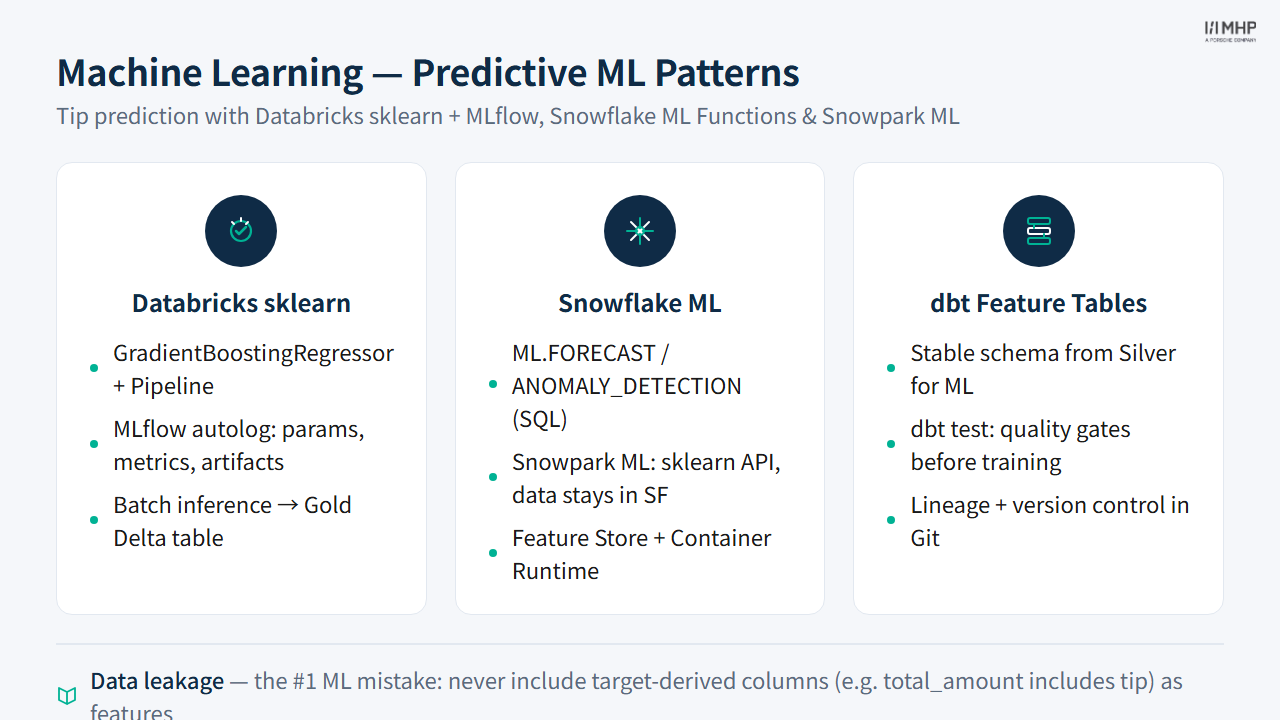
Databricks Runtime ML includes sklearn, XGBoost, LightGBM, and MLflow out of the box.
The training pattern
import mlflow
import mlflow.sklearn
from sklearn.ensemble import GradientBoostingRegressor
from sklearn.pipeline import Pipeline

# Load from Silver Delta table
df_pd = (
    spark.table(f"{catalog}.{silver_schema}.silver_nyc_taxi_enriched")
    .filter(col("payment_type_desc") == "Credit card")
    .filter(col("tip_amount") >= 0)
    .filter(col("fare_amount") > 0)
    .filter(col("trip_distance") > 0)
    .filter(col("passenger_count").between(1, 8))
    .filter(col("fare_amount") < 200)
    .filter(col("tip_amount") < 100)
    .sample(fraction=0.10, seed=42)
    .toPandas()                              # Spark → Pandas for sklearn
)

# Train with MLflow autolog — captures everything automatically
mlflow.sklearn.autolog(log_input_examples=True)

with mlflow.start_run(run_name=f"tip_prediction_{ATTENDEE_ID}"):
    model.fit(X_train, y_train)
    mlflow.log_metrics({"rmse": rmse, "mae": mae, "r2": r2})
Key concepts
train_test_split: Hold out 20% of data to evaluate how well the model generalises to unseen trips.
GradientBoostingRegressor: An ensemble of decision trees — each tree corrects the errors of the previous one. Strong default model for tabular data.
mlflow.sklearn.autolog(): One line captures all hyperparameters, train/test metrics, and the model artifact. View results in Experiments sidebar.
Batch inference: After training, score the full Silver table and write {attendee_id}_gold.ml_tip_predictions — a Gold table combining actual and predicted tips for Power BI.
NoteMosaic AI Model Serving (production pattern)
In this workshop, we use batch inference (score the full Silver table, write to Gold). Production deployments typically use Mosaic AI Model Serving — a managed REST endpoint that serves MLflow-registered models with auto-scaling.
Validate with cross-validation, not just one split
A single train_test_split can produce misleading metrics if the random split happens to favor easy or hard examples. For production models, use k-fold cross-validation (cross_val_score with k=5) to get a more robust estimate of model performance. In this workshop, a single split is sufficient to learn the workflow — but never ship a model to production based on one random split alone.
Feature importance
gbr = model_pipeline.named_steps["model"]
importance_df = pd.DataFrame({
    "feature": feature_names,
    "importance": gbr.feature_importances_
}).sort_values("importance", ascending=False)
Tip3.5 Discussion question
Which feature ranks highest? Is fare_amount the dominant predictor — and does that make intuitive sense? Is it borderline leakage?
Stretch: Databricks AutoML
AutoML tries XGBoost, LightGBM, RandomForest, and others automatically, then presents the winning notebook for inspection.
UI path: Experiments → Create AutoML Experiment → Regression → select Silver enriched table → target tip_amount → Start
3.6 Part 2: Snowflake — Two Approaches
Approach A: Snowflake ML Functions (SQL only)
Snowflake ML Functions are built-in Snowflake TABLE functions — ML as a SQL clause.
-- Predict future trip demand per borough (next 24 hours)
SELECT * FROM TABLE(
    ML.FORECAST(
        INPUT_DATA        => SYSTEM$REFERENCE('VIEW',
                            'DE_MASTERCLASS.{ATTENDEE_ID}_SQL_GOLD.V_HOURLY_TRIPS_BY_BOROUGH'),
        TIMESTAMP_COLNAME => 'PICKUP_HOUR_TS',
        TARGET_COLNAME    => 'TOTAL_TRIPS',
        SERIES_COLNAME    => 'PICKUP_BOROUGH',
        CONFIG_OBJECT     => {'prediction_interval': 24}
    )
);
-- Detect hours with anomalous average fares
SELECT * FROM TABLE(
ML.ANOMALY_DETECTION(
INPUT_DATA => SYSTEM$REFERENCE('VIEW', 'V_HOURLY_FARES'),
TIMESTAMP_COLNAME => 'FARE_HOUR',
TARGET_COLNAME => 'AVG_FARE',
SERIES_COLNAME => 'PICKUP_BOROUGH',
LABEL_COLNAME => NULL -- unsupervised
)
);What Snowflake ML Functions return:
| Function | Output columns |
|---|---|
ML.FORECAST |
SERIES, TS (future timestamp), FORECAST, LOWER_BOUND, UPPER_BOUND |
ML.ANOMALY_DETECTION |
SERIES, TS, Y (actual), ANOMALY (bool), ANOMALY_SCORE |
No training, no model management, no Python — results appear in one SQL statement.
Approach B: Snowpark ML (Python)
Snowpark ML has an sklearn-compatible API where all training runs on Snowflake’s compute.
from snowflake.ml.modeling.ensemble import GradientBoostingRegressor

# Note: identical class name and hyperparameters as sklearn
model = GradientBoostingRegressor(
    input_cols  = FEATURE_COLS,
    label_cols  = ["TIP_AMOUNT"],
    output_cols = ["PREDICTED_TIP"],
    n_estimators = 200,
    learning_rate = 0.05,
)

model.fit(df_snowpark)          # df is a Snowpark DataFrame — data stays in Snowflake
df_predictions = model.predict(df_test)
Critical difference from Databricks:
| Databricks (sklearn) | Snowflake (Snowpark ML) | |
|---|---|---|
| Data flow | .toPandas() → driver → sklearn |
Stays in Snowflake compute |
| Training location | Driver node (or distributed) | Snowflake warehouse |
| Data movement | Yes — to Python process | None |
| API | from sklearn.ensemble import ... |
from snowflake.ml.modeling.ensemble import ... |
3.7  Part 3: dbt — Feature Engineering & Quality Gates
dbt does not train models. It defines the canonical feature table that both training pipelines consume.
-- ml/dbt/models/ml_features_tip_prediction.sql
{{ config(materialized='table', tags=['ml', 'features']) }}

SELECT
    trip_distance, fare_amount, passenger_count,
    pickup_hour, pickup_day_of_week,
    CAST(is_weekend AS INTEGER) AS is_weekend,
    time_of_day, pickup_borough, dropoff_borough,
    tip_amount AS target_tip_amount
FROM {{ ref('silver_nyc_taxi_enriched') }}
WHERE payment_type_desc = 'Credit card'
  AND tip_amount >= 0
  AND fare_amount > 0
  AND trip_distance > 0
  AND passenger_count BETWEEN 1 AND 8
  AND fare_amount < 200
  AND tip_amount < 100
Run it:
dbt run  --target snowflake --select ml_features_tip_prediction
dbt test --target snowflake --select ml_features_tip_prediction
Why this matters for MLOps
flowchart LR
    S["silver_nyc_taxi_enriched"] --> F["ml_features_tip_prediction<br>dbt table"]
    F --> DB["Databricks<br>sklearn training"]
    F --> SF["Snowflake<br>Snowpark ML training"]

    style S fill:#0369a1,color:#fff,stroke:#075985
    style F fill:#6d28d9,color:#fff,stroke:#5b21b6
    style DB fill:#01065c,color:#fff,stroke:#000940
    style SF fill:#01065c,color:#fff,stroke:#000940
- Stability: Data scientists consume a named table with a stable schema. Silver schema changes don’t silently break training notebooks.
- Quality gates:
dbt testchecks every feature column before the model trains. Iftip_amounthas nulls, the test fails — poisoned data never reaches training. - Lineage:
dbt docsshows the full path from raw data to features. When a model’s accuracy drops, you can trace back to which upstream table changed. - Version control: Feature logic is a SQL file in Git — reviewable, diffable, tagged to model versions.
NoteDatabricks Feature Store
Databricks also offers Unity Catalog feature tables (formerly Feature Store) for point-in-time correct feature lookups. For this workshop’s scope, dbt tables are sufficient.
3.8 Full Comparison: ML across all three tools
| Aspect | Databricks (sklearn) |
Databricks AutoML |
Snowflake ML Functions |
Snowflake Snowpark ML |
dbt |
|---|---|---|---|---|---|
| What it does | Custom model training | Automated training + code generation | 4 managed ML functions (no model code needed) | Custom training on Snowflake compute | Feature table definition only |
| Interface | Python | Databricks UI + generated Python | SQL only | Python (snowflake-ml-python) + SQL |
SQL |
| Data location during training | Driver (via .toPandas()); use Spark UDFs or SPCS for larger datasets |
Driver | Stays in Snowflake | Stays in Snowflake (Snowpark DataFrame; Container Runtime for distributed scale) | N/A |
| Algorithms | Any sklearn / PyTorch / TF / XGBoost | sklearn family | FORECAST, ANOMALY_DETECTION, CLASSIFICATION, TOP_INSIGHTS only (no custom algorithms) |
sklearn, XGBoost, LightGBM, PyTorch, CatBoost, Prophet + more | N/A |
| Model tracking | MLflow (manual or autolog) | MLflow (auto) | Not in Model Registry — stored as SQL DDL schema-level objects | Snowflake Model Registry (snowflake-ml-python ≥ 1.5.0) |
N/A |
| Inference | Batch → Delta Gold table | Batch → Delta Gold table | model_name!PREDICT() or CALL model!FORECAST() in SQL (runs in warehouse) |
mv.run() (Python) or SQL call in warehouse |
N/A |
| Effort | Medium | Low | Very low | Medium | Low |
| Explainability | Feature importance + SHAP | SHAP (generated notebook) | CLASSIFICATION: SHOW_FEATURE_IMPORTANCE; FORECAST/ANOMALY_DETECTION: none |
SHAP via mv.explain() (GA in current Snowflake releases) |
N/A |
| Custom algorithms | ✅ Any | Partial (sklearn family) | ❌ (fixed function types only) | ✅ Any Python ML library (warehouse or Snowpark Container Services) | N/A |
| Python required | Yes | No (UI-driven) | No | Yes | No |
| Best for | Maximum algorithm flexibility, deep MLflow tracking | Fast baseline for non-ML engineers | No-code ML for analysts; time-series forecasting & classification | Python teams whose data is already in Snowflake | Feature governance and quality gates |
Tip3.9 When to use which?
- Snowflake ML Functions first — if
ML.FORECAST,ML.ANOMALY_DETECTION,ML.CLASSIFICATION, orML.TOP_INSIGHTScovers your use case, this is the lowest-friction path: pure SQL, no model code, no infrastructure. Note these models are not stored in the Snowflake Model Registry — they are schema-level DDL objects managed via SQL commands. - Snowpark ML — when you need custom algorithms and all data is already in Snowflake. No
.toPandas()overhead. - Databricks sklearn/AutoML — when you need full algorithm flexibility, deep MLflow tracking, or you already run your compute on Databricks.
- dbt — always, to define and test feature tables, regardless of which training platform you use.
3.10 Key Takeaways
- ML fits after Silver — data engineers build the feature table; data scientists (or the same person) train the model
- Data leakage is the #1 ML mistake:
total_amountincludes the target, cash trips encode “no tip” — both destroy model validity - Databricks offers maximum flexibility (any sklearn algorithm, MLflow tracking, AutoML) but requires
.toPandas()data movement - Snowflake ML Functions cover most business ML needs with zero Python — pure SQL forecasting, anomaly detection, classification
- Snowpark ML trains on Snowflake compute without data movement — ideal when all data is already in Snowflake
- dbt governs the feature table — tested, versioned, lineage-tracked features prevent silent model breakage
- Cross-validation (not a single train/test split) is the production standard for robust model evaluation
4. Quiz
Quiz: Module 9 — Machine Learning Quiz
Before moving on, make sure you can answer:
- Why must
total_amountnever be used as a feature when predictingtip_amount? - What is the key difference between Databricks sklearn training (
.toPandas()) and Snowpark ML training (data stays in Snowflake)? - When would you choose Snowflake ML Functions over Snowpark ML or Databricks sklearn?
5. Practice
Hands-on lab
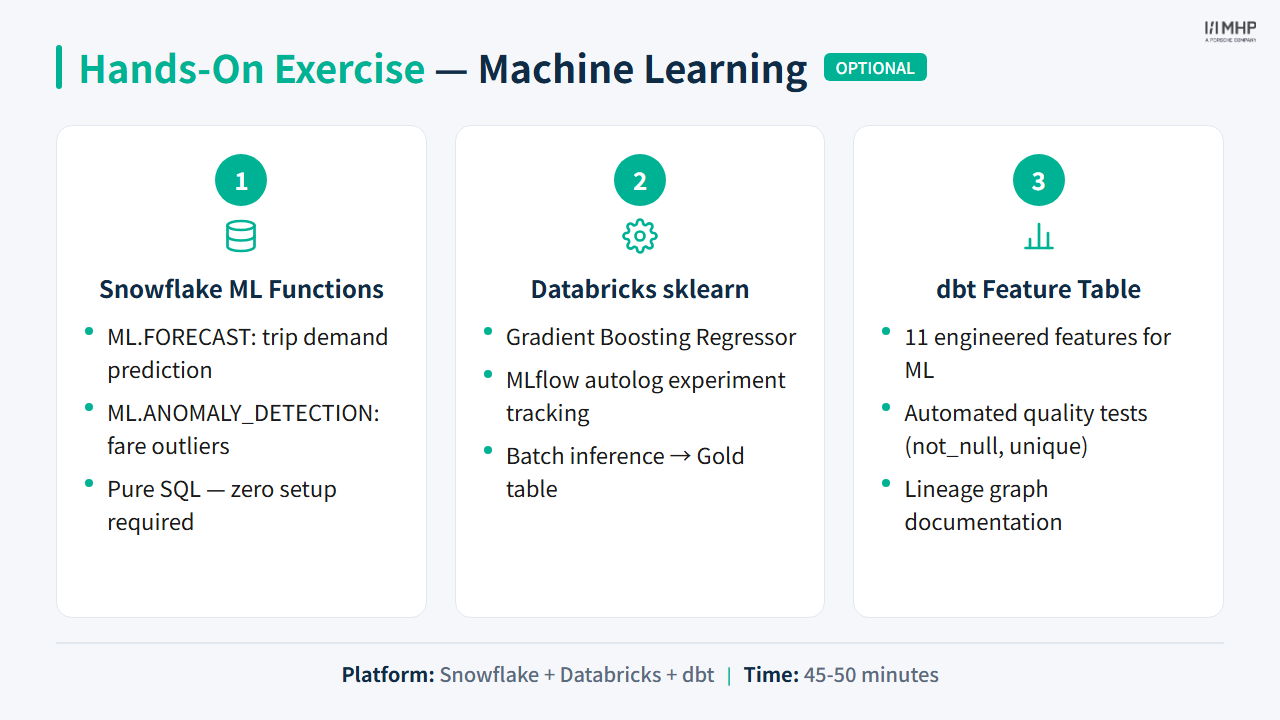
After the exercise, your facilitator facilitates a 10-minute comparison of Databricks sklearn, Snowflake Cortex ML, Snowpark ML, and dbt feature tables (lowest effort, most flexibility, SQL-only team).
Priya / Power BI: Predicted vs actual tip view in Power BI — batch scoring table from Gold.
Next module
End of YellowLine NYC Phase 2 — revisit Module 7: Comparison & Wrap-up tool choices with streaming/ML constraints.