flowchart TD
    subgraph CloudServices ["Cloud Services Layer"]
        AUTH["Authentication & RBAC"]
        QP["Query Parsing & Optimization"]
        META["Metadata & Lineage<br/><i>Horizon Catalog</i>"]
    end

    subgraph Compute ["Compute Layer — Virtual Warehouses"]
        WH1["X-Small<br/><i>1 credit/hr</i>"]
        WH2["Small<br/><i>2 credits/hr</i>"]
        WH3["Multi-cluster WH<br/><i>MIN/MAX clusters</i>"]
    end

    subgraph Storage ["Storage Layer"]
        DB["Databases & Schemas"]
        MP["Micro-partitions<br/><i>compressed columnar</i>"]
        STG["External Stages<br/><i>ADLS2 pointers</i>"]
    end

    CloudServices --> Compute
    Compute --> Storage

    classDef cloud fill:#29B5E8,color:#fff,stroke:#1e9bc9
    classDef compute fill:#0369a1,color:#fff,stroke:#075985
    classDef storage fill:#475569,color:#fff,stroke:#334155

    class AUTH,QP,META cloud
    class WH1,WH2,WH3 compute
    class DB,MP,STG storage
Module 3: Snowflake Pipeline
SQL, Snowpark, and external stages

Duration: 75 min — Animation (3) · Think & Discuss (7) · Theory (15) · Quiz (3) · Practice (47)
NoteBefore you start
- Snowflake trial + Git workspace or copy-paste
- Lab: complete Exercise: Snowflake § Snowsight & account setup before Bronze ingestion
1. Animation
2. Think & Discuss
Situation: Marcus reviewed the Databricks prototype: “My team lives in SQL — not PySpark notebooks.” Elena asks Bob to rebuild the same 12 KPIs on Snowflake. Priya connects her Map page — identical Gold schema.
Prompts:
- What is Marcus asking for — a different tool, a different skill set, or both?
- How do you keep the same 12 KPIs without PySpark? What would you rewrite?
- Who at YellowLine NYC will maintain this pipeline after MHP leaves? What skills do they need?
- How do you load Parquet from ADLS2 into Snowflake Bronze without Spark?
- If Gold schema stays identical, can Priya keep the same Power BI reports? Why or why not?
3. Theory
Marcus: “We need SQL, not notebooks.” Elena: Rebuild the same medallion on Snowflake — identical Gold KPIs, SQL-first maintainability.
Same architecture. Different implementation philosophy.
NoteExternal stages from ADLS2
Snowflake loads Parquet via external stage + COPY INTO — two steps vs Databricks one-line spark.read.parquet(). More control over error handling; familiar pattern for SQL teams.
3.1 Theory: Snowflake Essentials
Architecture
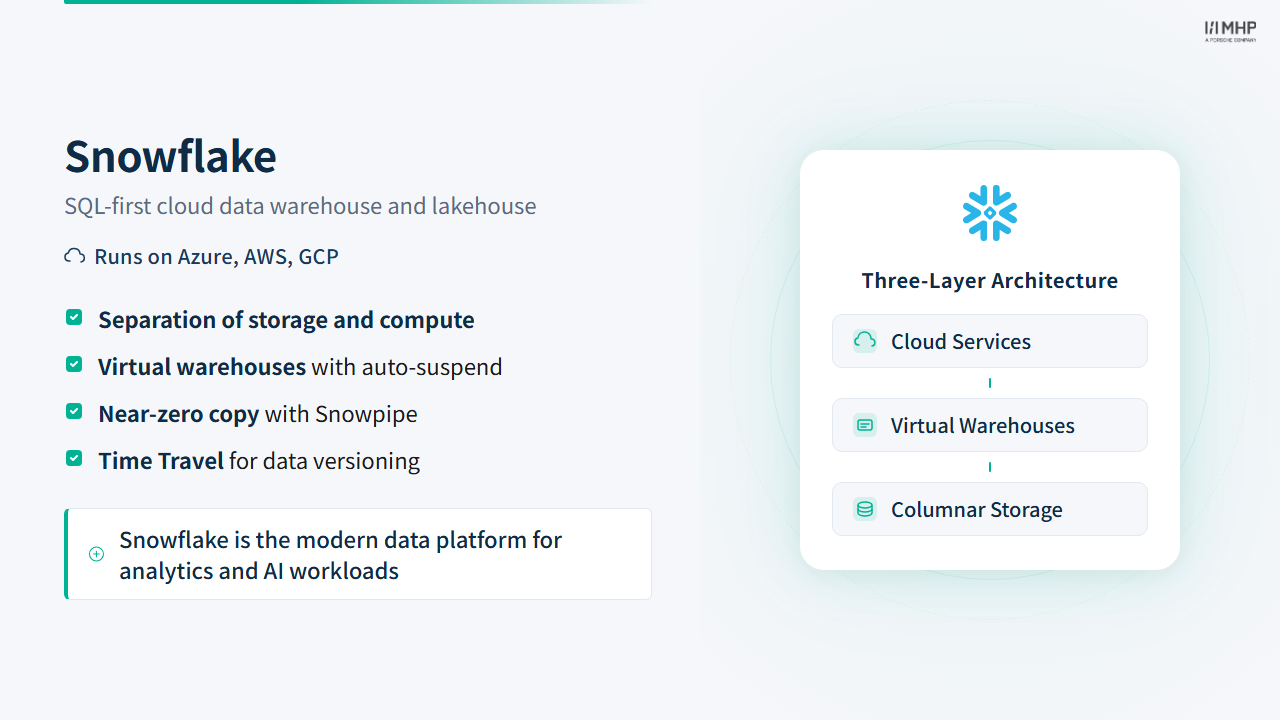
Snowflake uses a three-layer architecture that separates storage, compute, and cloud services into independent, scalable tiers:
Storage layer: Data is stored in Snowflake’s proprietary micro-partitioned columnar format — compressed, automatically clustered, and not directly accessible as files (unlike Delta Lake’s open Parquet). Data is organized into databases and schemas, which are logical namespaces only (they don’t map to file paths).
Compute layer (Virtual Warehouses): Independent compute clusters that execute queries. Warehouses range from X-Small (1 credit/hour) to 6X-Large (512 credits/hour). They auto-suspend after a configurable idle period (default: 10 minutes) and resume in 2–5 seconds — so you only pay while queries are running. For ETL workloads that finish quickly, set auto-suspend to 60 seconds to minimize idle billing.
Cloud services layer: Authentication, query parsing, metadata management, and access control — all managed by Snowflake. This includes the Snowflake Horizon Catalog (governance: tags, masking policies, lineage), which is the parallel to Databricks Unity Catalog.
Warehouse sizing for ETL
Set auto-suspend to 60 seconds for ETL warehouses — the default 10 minutes wastes credits for batch workloads that finish quickly. Use X-Small or Small for development and most Silver/Gold transforms; only scale up when you see spilling to remote storage or long query times. Multi-cluster warehouses add parallel clusters (MIN_CLUSTER_COUNT / MAX_CLUSTER_COUNT) for concurrency — not automatic size changes; the workshop uses a single-cluster DE_WORKSHOP_WH.
External Stages + COPY INTO
Snowflake requires a two-step ingestion pattern: first create a stage pointing to cloud storage, then execute COPY INTO to bulk-load data. This is more verbose than Databricks’ one-line spark.read.parquet(), but gives explicit control over file format options and error handling (ON_ERROR = 'CONTINUE' skips bad rows and records them in load history — same pattern as the workshop lab).
Workshop lab (explicit schema) — matches snowflake/sql/bronze/01_ingest_trips.sql:
-- Create external stage pointing to ADLS2
CREATE STAGE my_stage
  URL = 'azure://account.blob.core.windows.net/container/path/'
  CREDENTIALS = (AZURE_SAS_TOKEN = '...');

CREATE TABLE my_table (col1 INT, col2 VARCHAR, ...);

COPY INTO my_table (col1, col2, ...)
FROM (
  SELECT $1:col1::INT, $1:col2::VARCHAR, ...
  FROM @my_stage
)
FILE_FORMAT = (TYPE = PARQUET)
ON_ERROR = 'CONTINUE';
Production shortcut (schema inference) — when you want Snowflake to detect columns from Parquet/JSON/CSV:
CREATE TABLE my_table
  USING TEMPLATE (
    SELECT ARRAY_AGG(OBJECT_CONSTRUCT(*))
    FROM TABLE(INFER_SCHEMA(LOCATION => '@my_stage', FILE_FORMAT => 'parquet_format'))
  );

COPY INTO my_table FROM @my_stage
  FILE_FORMAT = (TYPE = PARQUET)
  MATCH_BY_COLUMN_NAME = CASE_INSENSITIVE;
flowchart LR
ADLS2[("Azure ADLS2<br/>Parquet files")]
STAGE["@my_stage<br/><i>External Stage</i>"]
TABLE[("my_table<br/><i>micro-partitions</i>")]
ADLS2 -->|"CREATE STAGE<br/>URL + ADLS2 SAS token"| STAGE
STAGE -->|"COPY INTO<br/>FILE_FORMAT = PARQUET"| TABLE
classDef source fill:#0057b8,color:#fff,stroke:#003d82
classDef stage fill:#29B5E8,color:#fff,stroke:#1e9bc9
classDef table fill:#01065c,color:#fff,stroke:#000940
class ADLS2 source
class STAGE stage
class TABLE table
Column casing — a cross-platform gotcha
Snowflake normalizes unquoted identifiers to UPPER_CASE. Databricks defaults to lower_case. When you write fare_amount in a Snowflake query, Snowflake interprets it as FARE_AMOUNT. This matters when: (a) hand-writing cross-platform SQL, (b) reading Delta Lake tables from Snowflake or vice versa, (c) debugging why a SELECT fare_amount returns nulls from an externally-created table. dbt handles this transparently via { adapter.quote() }, but hand-written SQL does not.
Snowpipe, Time Travel, and Databricks parallels
Beyond batch COPY INTO, Snowflake provides capabilities that matter in production — each has a Databricks parallel, with different ergonomics:
| Capability | Snowflake | Databricks parallel | Key difference |
|---|---|---|---|
| Continuous file ingest | Snowpipe — serverless, event-driven loads from a stage (minutes latency) | Auto Loader (cloudFiles) — incremental file detection on cloud storage |
Snowpipe is pipe-per-table; Auto Loader is Spark-based |
| Row-level / streaming ingest | Snowpipe Streaming (insert-only) | Structured Streaming, DLT | Module 8 covers Snowflake Dynamic Tables vs Databricks streaming |
| Historical queries | Time Travel — AT / BEFORE, UNDROP TABLE |
Delta time travel — VERSION AS OF, TIMESTAMP AS OF |
Snowflake: account-wide retention policy; Delta: per-table transaction log |
| Retention | Default 1 day on all editions; Enterprise can set permanent objects up to 90 days (DATA_RETENTION_TIME_IN_DAYS) |
Delta: default ~7–30 days via deletedFileRetentionDuration / logRetentionDuration (configurable) |
Workshop trials use the 1-day default unless an admin raises it |
- Snowpipe pairs well with event-driven architectures (e.g., Azure Event Grid → pipe notification) without keeping a warehouse running for ingest.
- Time Travel supports auditing, reproducing a past query result, and recovering dropped objects (
UNDROP TABLE) within the retention window.
Snowflake’s edge is uniform platform semantics (same Time Travel syntax on every table) and Fail-safe beyond Time Travel — not that Databricks lacks versioning or incremental ingest.
Snowpark vs PySpark — Side by Side
Beyond API syntax, the bigger question for consultants is when to choose Snowflake vs Databricks. The next slide compares the two platforms at a strategic level.
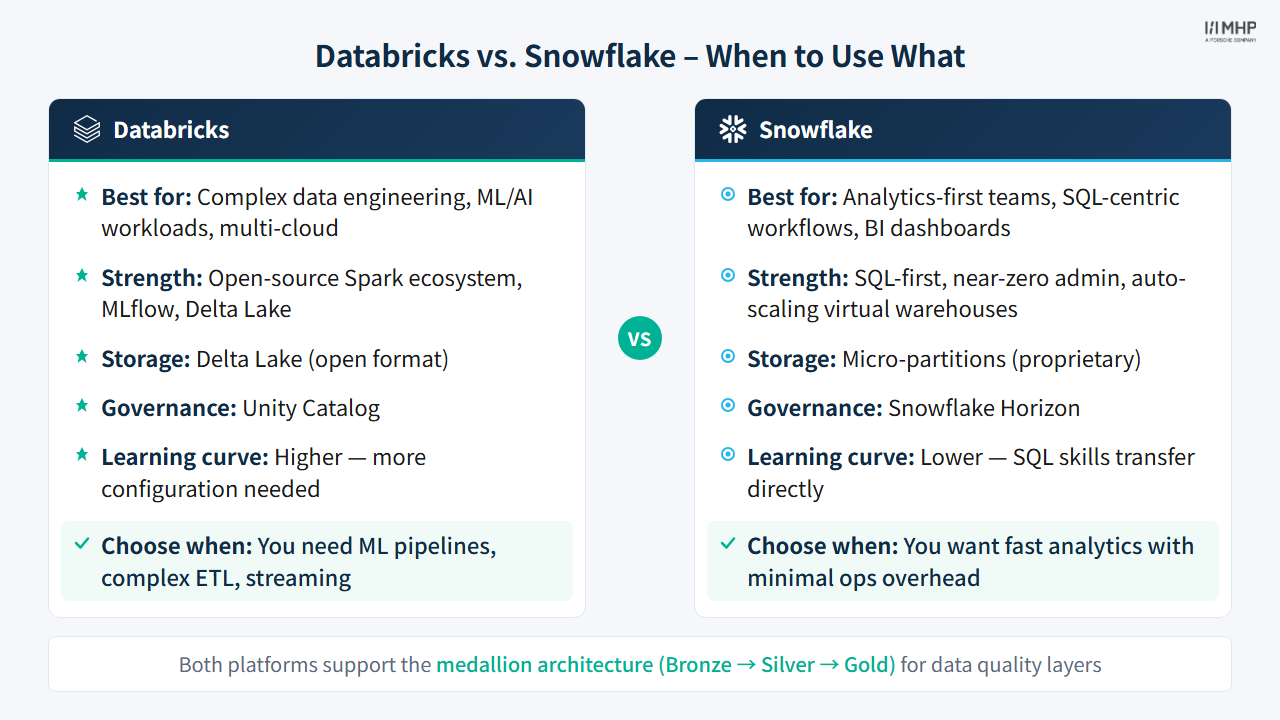
Snowpark was deliberately designed to feel like PySpark — the API surface is nearly identical. However, there are important differences to be aware of:
| Operation | PySpark (Databricks) | Snowpark (Snowflake) |
|---|---|---|
| Read table | spark.table("my_table") |
session.table("MY_TABLE") |
| Filter | df.filter(col("x") > 0) |
df.filter(col("X") > 0) |
| Add column | df.withColumn("y", ...) |
df.with_column("Y", ...) |
| Group + Agg | df.groupBy("x").agg(...) |
df.group_by("X").agg(...) |
| Write | df.write.saveAsTable("t") |
df.write.save_as_table("T") |
| Import | from pyspark.sql.functions |
from snowflake.snowpark.functions |
Where the APIs diverge: Snowpark uses snake_case method names (with_column, group_by, save_as_table) while PySpark uses camelCase (withColumn, groupBy, saveAsTable). Snowflake stores unquoted identifiers as UPPER_CASE; Snowpark col() references typically match that casing. PySpark column names are case-insensitive by default. Snowpark also lacks a .cache() equivalent — Snowflake manages result caching at the warehouse level.
3.2 Live demo walkthrough
Part 1: SQL Approach
Setup (snowflake/sql/setup/ — Git workspace or copy-paste):
- Git API integration — + API Integration in the Git dialog (setup § GUI); alternative:
01_git_api_integration.sql - 02_account_setup.sql — Create database, warehouse, schemas, role (Exercise § Snowsight)
- 03_git_workshop_grants.sql — Git grants for
DE_WORKSHOP_ROLE(Git path only) - 04_external_stage.sql — Configure ADLS2 external stage (facilitator SAS token)
Before Module 6: 05_cortex_access.sql — Module 6 — Cortex access
Reference (do not run in lab): reference/storage_integration.sql — production storage integration; trials use SAS in 04_external_stage.sql.
Pipeline (snowflake/sql/):
- bronze/01_ingest_trips.sql — COPY INTO from external stage
- silver/01_create_cleaned.sql + 02_create_enriched.sql — SQL transforms
- gold/01_create_kpis.sql — 12 KPI tables
Part 2: Snowpark Python
Optional path — full steps in Exercise: Snowflake § Snowpark.
- B.1 Workspaces notebooks (recommended): open
.ipynbfiles in Snowsight —get_active_session(), no.env - B.2 Terminal / Codespace (optional):
snowflake/snowpark/*.pyfrom your machine — needs.env(Exercise: dbt §.env)
Your facilitator shows the same Silver/Gold transforms using Snowpark: - Compare 02_silver_cleaning.py (Snowpark) with 01_create_cleaned.sql (SQL) - Note the API similarities with Databricks PySpark
3.3 Key Takeaways
- Snowflake excels at SQL-native workloads with instant, elastic compute
- External Stages + COPY INTO provide efficient bulk ingestion from cloud storage
- Snowpark brings Python DataFrame processing to Snowflake’s engine
- PySpark → Snowpark migration is straightforward due to similar APIs
- In production, use Tasks + Streams + Stored Procedures (see Module 5)
4. Quiz
Quiz: Module 3 — Snowflake Pipeline Quiz
Before moving on, make sure you can answer:
- What Snowflake object points to external cloud storage, and what command loads data from it?
- Name two differences between Snowpark and PySpark syntax (method naming, case sensitivity).
- What happens to a virtual warehouse after its auto-suspend period expires, and why does this matter for cost?
5. Practice
Hands-on lab
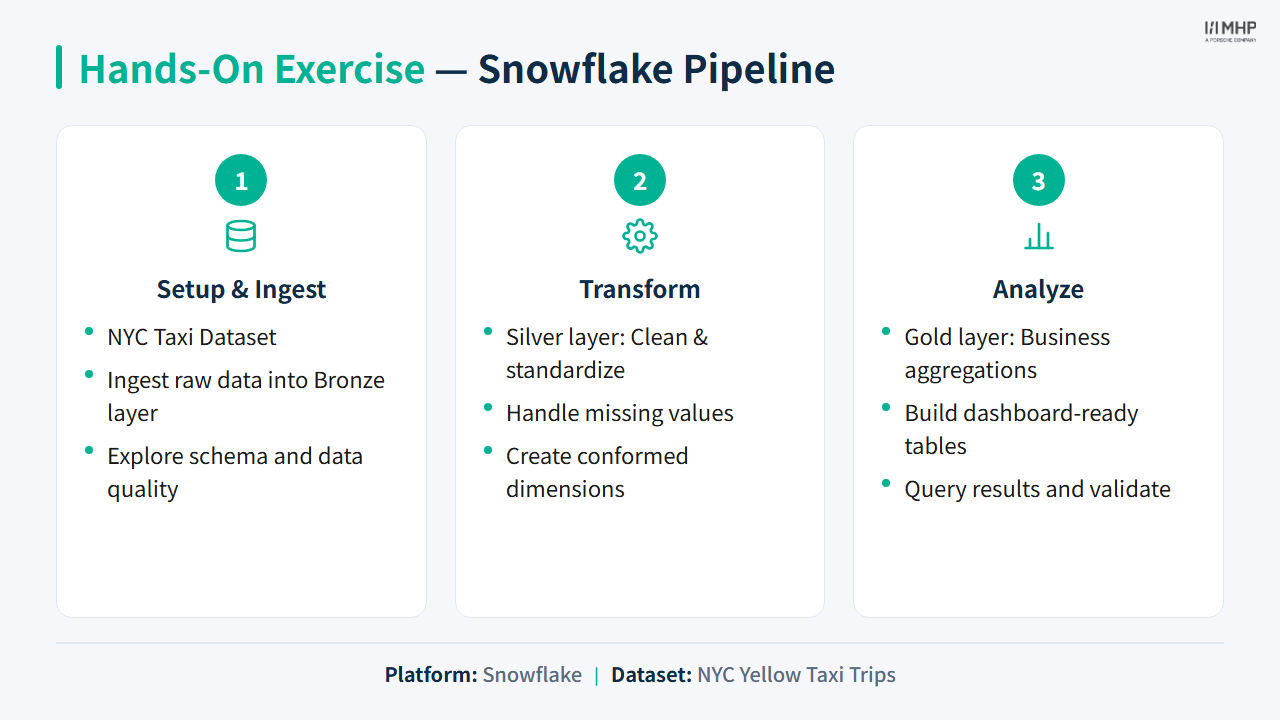
Scripts under snowflake/sql/ and snowflake/snowpark/.
Priya / Power BI: Map page — borough shape map and top pickup zones from kpi_borough_analysis, kpi_top_pickup_zones.
Next module
Module 4: dbt Pipeline — Marcus’s board asks: Where does each dashboard number come from?